
VB.NET, C#, PowerShell Tipsサイト
VB.NET, C#, PowerShellを使用しているエンジニアのためのサイト。
基本的な使用方法から開発で役立つTipsまで幅広く取り扱っています。
HIRO's.NET RSS
そんな悩みは当サイトで解決!!
HOME > VB.NET 2005 Tips > コントロール > Button Tips メニュー
02.テキスト表示位置を設定する
ボタンに表示されるテキストの位置を設定するには、TextAlignプロパティを使用します。TextAlignプロパティにはContentAlignment列挙体をセットします。
ContentAlignment列挙体
| メンバ名 | 説明 |
|---|---|
| BottomCenter | 下端中央 |
| BottomLeft | 下端左寄せ |
| BottomRight | 下端右寄せ |
| MiddleCenter | 中段中央 |
| MiddleLeft | 中段左寄せ |
| MiddleRight | 中段右寄せ |
| TopCenter | 上段中央 |
| TopLeft | 上段左寄せ |
| TopRight | 上段右寄せ |
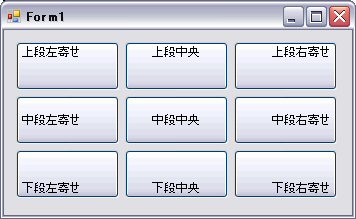
サンプル
Private Sub Form1_Load(ByVal sender As System.Object, ByVal e As System.EventArgs) Handles MyBase.Load
    Button1.TextAlign = ContentAlignment.TopLeft
    Button2.TextAlign = ContentAlignment.TopCenter
    Button3.TextAlign = ContentAlignment.TopRight
    Button4.TextAlign = ContentAlignment.MiddleLeft
    Button5.TextAlign = ContentAlignment.MiddleCenter
    Button6.TextAlign = ContentAlignment.MiddleRight
    Button7.TextAlign = ContentAlignment.BottomLeft
    Button8.TextAlign = ContentAlignment.BottomCenter
    Button9.TextAlign = ContentAlignment.BottomRight
End Sub